Configure Switchable Graphics without hassle
In this article I describe in short what to do in Arch Linux with hybrid systems like with my Laptop (ASUS TUF Gaming FX504 Series) which includes switchable graphics between Nvidia / Intel.
Preparation
First have a look at your actual GPUs and what models we have. For the discrete grap
1
lspci -knn
With this command you’re able to see your graphic adapters and the loaded drivers in kernel.
Look for a line that begins with
VGAthis is your integrated graphics card (mostly Intel) and3Dis your discrete card.
1
2
3
4
5
6
7
8
9
10
00:02.0 VGA compatible controller [0300]: Intel Corporation CoffeeLake-H GT2 [UHD Graphics 630] [8086:3e9b]
        DeviceName: Onboard - Video
        Subsystem: ASUSTeK Computer Inc. Device [1043:18fe]
        Kernel driver in use: i915
        Kernel modules: i915

01:00.0 3D controller [0302]: NVIDIA Corporation GP107M [GeForce GTX 1050 Ti Mobile] [10de:1c8c] (rev a1)
        Subsystem: ASUSTeK Computer Inc. Device [1043:18fe]
        Kernel driver in use: nvidia
        Kernel modules: nouveau, nvidia_drm, nvidia
Switching cards with Nvidia / Intel systems
There’s a little powerful tool called envycontrol so we need to install it. It’s available in the AUR.
Installation
1
yay -S envycontrol
Usage
1
2
3
4
5
6
7
8
9
10
11
12
13
14
15
16
17
18
19
20
21
usage: envycontrol [-h] [-v] [-q] [-s MODE] [--dm DISPLAY_MANAGER] [--force-comp] [--coolbits [VALUE]] [--rtd3 [VALUE]]
                   [--use-nvidia-current] [--reset-sddm] [--reset] [--cache-create] [--cache-delete] [--cache-query] [--verbose]

options:
  -h, --help            show this help message and exit
  -v, --version         Output the current version
  -q, --query           Query the current graphics mode
  -s MODE, --switch MODE
                        Switch the graphics mode. Available choices: integrated, hybrid, nvidia
  --dm DISPLAY_MANAGER  Manually specify your Display Manager for Nvidia mode. Available choices: gdm, gdm3, sddm, lightdm
  --force-comp          Enable ForceCompositionPipeline on Nvidia mode
  --coolbits [VALUE]    Enable Coolbits on Nvidia mode. Default if specified: 28
  --rtd3 [VALUE]        Setup PCI-Express Runtime D3 (RTD3) Power Management on Hybrid mode. Available choices: 0, 1, 2, 3. Default if
                        specified: 2
  --use-nvidia-current  Use nvidia-current instead of nvidia for kernel modules
  --reset-sddm          Restore default Xsetup file
  --reset               Revert changes made by EnvyControl
  --cache-create        Create cache used by EnvyControl; only works in hybrid mode
  --cache-delete        Delete cache created by EnvyControl
  --cache-query         Show cache created by EnvyControl
  --verbose             Enable verbose mode
Widgets to control this more easily
For KDE users there is an extension called Optimus GPU Switcher for Plasma 6 which is available through KDE itself. 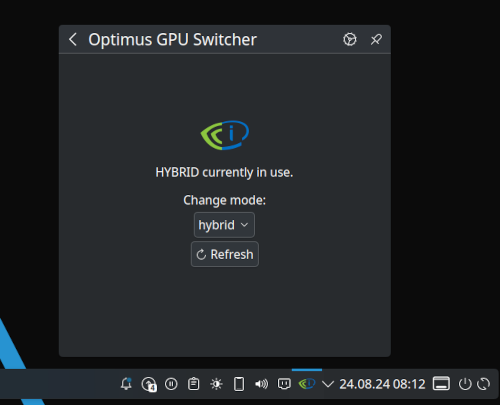
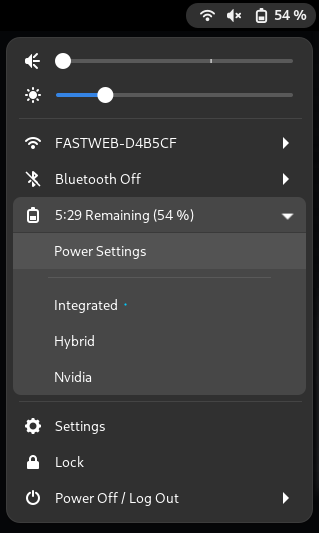
For GNOME users there would be GPU Profile Selector available on https://extensions.gnome.org.