The Network Time Protocol (NTP) is a networking protocol for clock synchronization between computer systems over packet-switched, variable-latency data networks. In operation since before 1985, NTP is one of the oldest Internet protocols in current use. NTP was designed by David L. Mills of the University of Delaware.
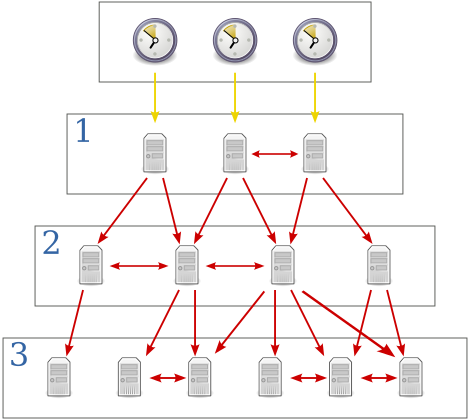
A bit explaination
(c) wikimedia.org
| stratum | description |
|---|
| Stratum 0 | high-precision timekeeping devices such as atomic clocks, GNSS (including GPS) or other radio clocks, or a PTP-synchronized clock. |
| Stratum 1 | computers whose system time is synchronized to within a few microseconds of their attached stratum 0 devices. Stratum 1 servers may peer with other stratum 1 servers for sanity check and backup. |
| Stratum 2 | computers that are synchronized over a network to stratum 1 servers. Often a stratum 2 computer queries several stratum 1 servers. Stratum 2 computers may also peer with other stratum 2 computers to provide more stable and robust time for all devices in the peer group. |
| Stratum 3 | computers that are synchronized to stratum 2 servers. They employ the same algorithms for peering and data sampling as stratum 2, and can themselves act as servers for stratum 4 computers, and so on. |
| Stratum 16 | is used to indicate that a device is unsynchronized. |
Installation
Configuration
Adjust the listen device. Edit /etc/default/ntp.
| parameter | description |
|---|
| -4 | Forces DNS resolution over IPv4 |
| -g | Allows the time to be set to any value without restriction |
| -U | Number of seconds to wait between interface list scans. Set to 0 to disable dynamic interface list updating. |
| other | https://linux.die.net/man/8/ntpd |
Backup the original ntp.conf before editing, because there are useful examples and comments in it.
1
| cp /etc/ntp.conf{,.orig}
|
This simple trick will do the same as cp /etc/ntp.conf /etc/ntp.conf.orig.
Let’s edit /etc/ntp.conf.
1
2
3
4
5
6
7
8
9
10
11
12
13
14
15
16
17
18
19
20
| driftfile /var/lib/ntp/ntp.drift
statistics loopstats peerstats clockstats
filegen loopstats file loopstats type day enable
filegen peerstats file peerstats type day enable
filegen clockstats file clockstats type day enable
server ptbtime1.ptb.de iburst
server ptbtime2.ptb.de iburst
server ptbtime3.ptb.de iburst
restrict -4 default kod notrap nomodify nopeer noquery limited
restrict 127.0.0.1 # Allow host
restrict 1.2.3.1 notrap nomodify nopeer
restrict 1.2.3.2 notrap nomodify nopeer
restrict 1.2.3.3 notrap nomodify nopeer
restrict 192.0.2.0 mask 255.255.255.0 nomodify notrap nopeer # Allow subnet
interface ignore ipv6
interface listen ipv4
|
| value | description |
|---|
| driftfile | name and path of the frequency file |
| statistics | and all filegen options belong to default configuration |
| server | your NTP servers you want to synchronize with. Should be near Stratum 0. |
| restrict | first line, access deny any to use this NTP server |
| restrict | after that you can allow IPs or subnets to use this NTP server |
| interface | just listen to IPv4, but not IPv6 |
Usage
1
2
| systemctl enable ntp
systemctl ( start | stop | restart ) ntp
|
Troubleshooting
Check if NTP queries are made by the NTP server:
Output should look like:
1
2
3
4
5
| remote refid st t when poll reach delay offset jitter
==============================================================================
+192.53.103.108 .SHM. 1 u 50 64 377 15.044 0.248 0.199
+192.53.103.104 .PTB. 1 u 44 64 377 14.130 -0.225 0.019
*192.53.103.103 .PTB. 1 u 60 64 377 15.021 0.221 0.040
|
To obtain a brief status report from ntpd, issue the following command:
Output if not synchronizing successfully:
1
2
3
| unsynchronised
time server re-starting
polling server every 64 s
|

 (c) wikimedia.org